 HuntGrid
Ice fishing
Ice fishing with Ice Mode and a tip-up tracker
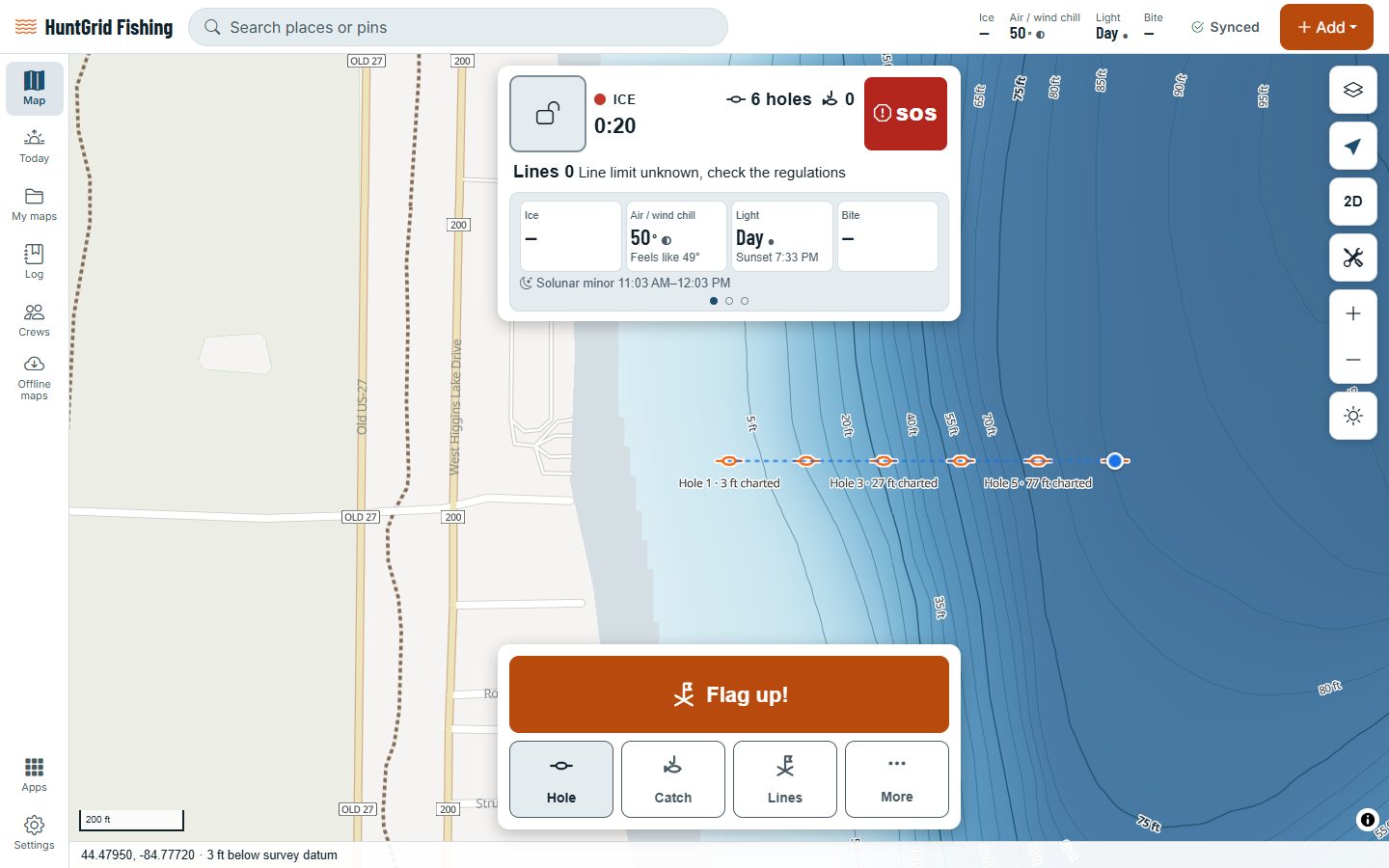
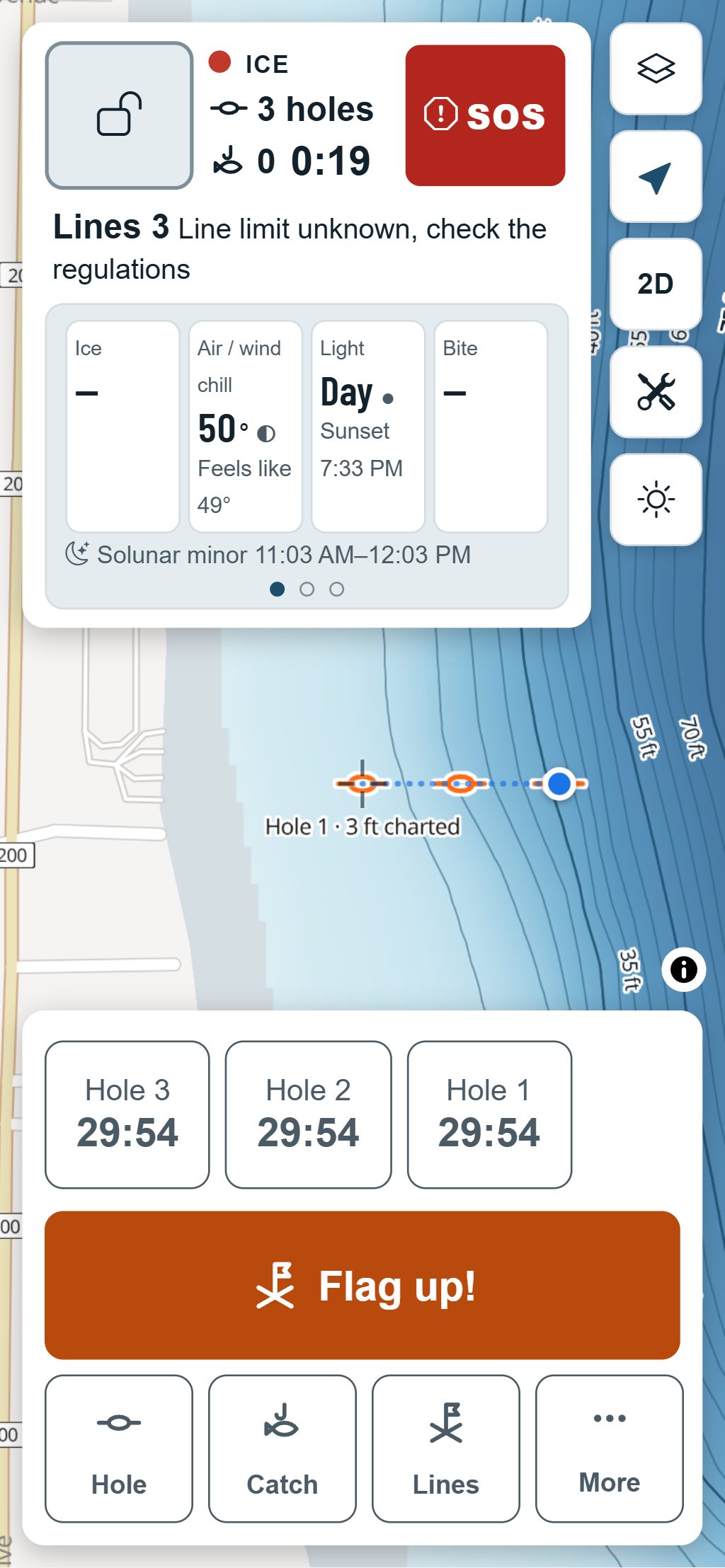
Ice Mode turns Fish Mode into a hardwater tool. Mark each hole and it gets a number, and the depth from the lake’s depth map where there is one. Set your tip-ups, watch their timers and log a flag with one big button.
Map data © OpenStreetMap contributors, © OpenMapTiles; terrain: Copernicus WorldDEM-30 (credits)
Built for cold hands
Ice is never 100% safe. HuntGrid never tells you ice will hold you and never shows a guessed thickness.
Flag up!
One big button logs a flag on your tip-up, right when it goes up.
Numbered holes with depth
Each hole gets the next number and the depth under it, where the lake has a depth survey.
Tip-up tracker
Your tip-ups in a list, each with a timer since you last checked it.
Lines against the limit
Where we have the rules for that water, the header shows your lines in use against the legal limit.
Big targets, no signal needed
Large buttons, the screen stays on, no ads, and it all works offline.
Ice reports
Anglers’ reports of thickness, clear or white ice, snow and slush, placed on the lake, never on their exact spot, with their age. They expire.
Ice status
Open, forming, likely ice-covered or breaking up, from a lake model, reports and satellite ice for big lakes. A state, never a thickness.
Ice-on and ice-off dates
On lakes with open freeze and thaw records: when the lake usually freezes and thaws, and the latest winter against the usual.
Map data © OpenStreetMap contributors, © OpenMapTiles; terrain: Copernicus WorldDEM-30 (credits)
Ice Mode
Every hole, every line, every flag
Ice Mode keeps the day in order on the lake, with or without a signal.
- Holes, flags and catches save on your phone and sync when you’re back in range.
- Line limits come from the rules engine, labelled unverified until a person checks them. Always confirm with the official regulations.
- Mitten-sized buttons, loud timer alarms and a battery saver for the cold.
- Shelter rules and removal deadlines, with a reminder before the date.
- Ice roads reported by resorts and anglers, with their date. They expire, and they’re never shown as a promise.
- An ice guide that works offline: official thickness guidance with its source, self-rescue and what to bring.
Ice is never 100% safe. Check the ice yourself as you go, follow your local authority’s ice guidance, and carry ice picks and a throw rope.
Questions
Still have a question? Read the HuntGrid Fishing help pages or email support@huntgrid.net.
Will HuntGrid tell me if the ice is thick enough?
No. Ice changes from one step to the next, so the app never says ice will hold you and never shows a guessed thickness. Check it yourself and follow your local authority’s guidance.
Does Ice Mode work with no cell signal?
Yes. Holes, tip-ups, timers and catches all work offline and sync when you’re back in range.
How many lines can I fish?
It depends on where you are. Where we have the rules for that water, Ice Mode shows your lines against the limit, labelled unverified until a person checks it. Where we don’t, it says so: check the official regulations.
Your next fishing trip starts on the map
Create a free account and open HuntGrid Fishing in your browser. The same account works for HuntGrid Hunt.
Already have an account? Sign in