 HuntGrid
Offline maps
Offline hunting maps that work with zero bars
Download the places you hunt before you leave home: topo, 3D terrain, public land, hunting units, your pins and the forecast. Out where there are no bars, your phone’s GPS still puts you on the map, and everything you add is saved on the phone until you’re back in range.
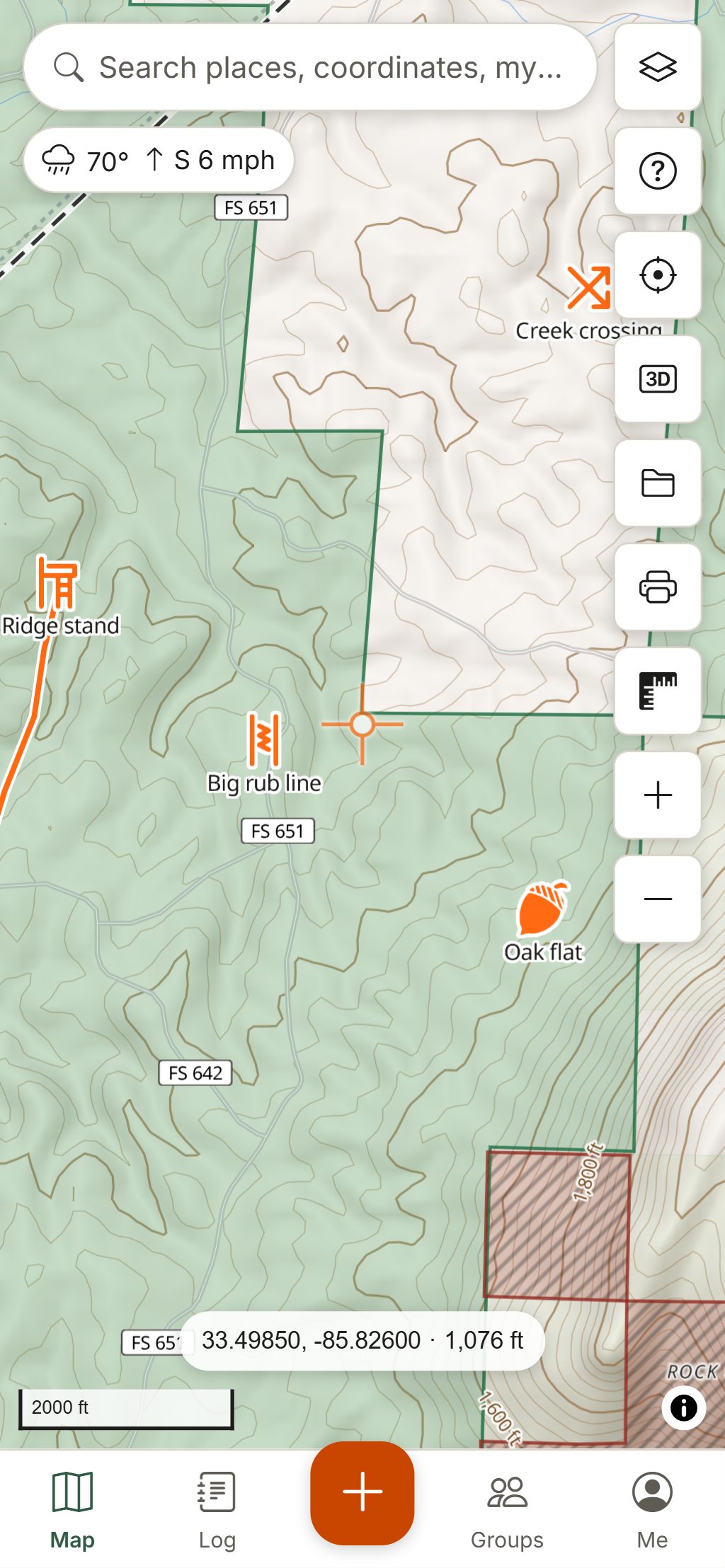
Map data © OpenStreetMap contributors, © OpenMapTiles; terrain: Copernicus WorldDEM-30 (credits)
What comes with you offline
An offline area is more than a picture of the map. It carries the layers, answers and tools you use in the field.
Topo, terrain and imagery
The basemap, hillshade, contour lines and 3D terrain, plus satellite imagery where its licence allows offline copies (the US, Ontario and New Brunswick).
Land and units
“Can I hunt here?”, public and Crown land, parks, closures and hunting units. Tap the map and the answer comes from the downloaded tiles, no signal needed. About the land layers.
Forecast and seasons
Saving an area also saves the forecast across it and the checked seasons and legal-hours rules of the states or provinces it touches, refreshed whenever you’re online.
Your pins, tracks and log
Stands, waypoints, lines, sightings, harvests and photos save on the phone first and sync to your other devices when you have signal again.
GPS tools
Your position, track recording, Go to a waypoint, Back to truck and the boundary alert all run on the phone’s GPS and the downloaded area.
No guessing at the edges
Offline, the map hatches everything outside your downloaded areas, so a blank spot reads as “not saved”, not “nothing here”.
How it works
Download a hunting area in four steps
Open Offline maps
On a phone it’s under Me, then Offline maps. Choose Download new area.
Pick the area
Use the map view, an area you drew, a circle of 1 to 20 km around one of your waypoints, or a whole hunting unit or piece of public land with “Save for offline” on the What’s here card.
Choose layers and detail
Topo, terrain and the overlays you have on are ticked for you. Each layer shows its size, and you pick Standard or High detail before anything downloads.
Download, then test
The area is prepared on our server and downloads to your device, checked file by file. You get a notice when it’s ready, and “Update available” when its data changes.
Before you lose signal: a short checklist
HuntGrid runs in your browser and installs to your home screen like an app, on iPhone, Android and computers. Store apps are planned.
Install it first
On iPhone and iPad, Safari can clear a website’s data when it hasn’t been used for a while; apps on the Home Screen keep theirs. Add HuntGrid to the Home Screen before you download. Offline maps on iPhone.
Try airplane mode at home
Turn on airplane mode and open the map. If your area, layers and pins show, you’re set.
Keep HuntGrid on screen to record
In the browser, location and track recording work while HuntGrid is open on screen. Pocket mode turns the screen black while it records.
Mark the truck
Drop a Truck or Parking waypoint before you walk in. Back to truck then guides you out by distance and bearing. Place-name search needs a connection; typed coordinates don’t.
The free plan includes 3 offline areas of up to 5,000 km² (about 1,930 square miles) each, with every layer. Larger plans are planned for later.
Questions
Still have a question? Read the help pages or email support@huntgrid.net.
Do hunting apps work without cell service?
Some do, if you download the map first. Your phone’s GPS works without cell service, so HuntGrid shows where you are on any area you saved. The land layers, hunting units, your pins and the saved forecast are on the phone, and what you add syncs when you’re back in range.
How much can I download for free?
The free plan includes 3 offline areas of up to 5,000 km² (about 1,930 square miles) each, and every layer can go offline with them. Delete an area to make room for another one.
Do offline maps work on iPhone?
Yes. Add HuntGrid to your Home Screen from Safari first, so iOS keeps your maps, then download your areas. See the iPhone guide.
Can I record a track with no signal?
Yes. GPS doesn’t need cell service. In the browser, location and track recording work while HuntGrid is open on screen; pocket mode keeps the screen black while it records.
Will my waypoints sync when I get signal back?
Yes. Everything you add is saved on the phone first and syncs to your account and your other devices the next time you have a connection. Nothing waits on the network.
Does the offline map include satellite imagery?
Where the imagery’s licence allows offline copies: across the US, and in Ontario and New Brunswick. Topo, terrain and the land layers can go offline everywhere they exist.
Your next hunt starts on the map
Create a free account, download your area and head out. No credit card, no per-state fees.
Already have an account? Sign in