 HuntGrid
Satellite and hybrid
Satellite hunting maps for e-scouting
Switch the map to Satellite or Hybrid to see the actual ground: fields, timber edges, clearcuts, beaver ponds and the logging road you’ll park on. Your pins, land status and hunting units stay on top, and Hybrid adds roads, trails and place names.
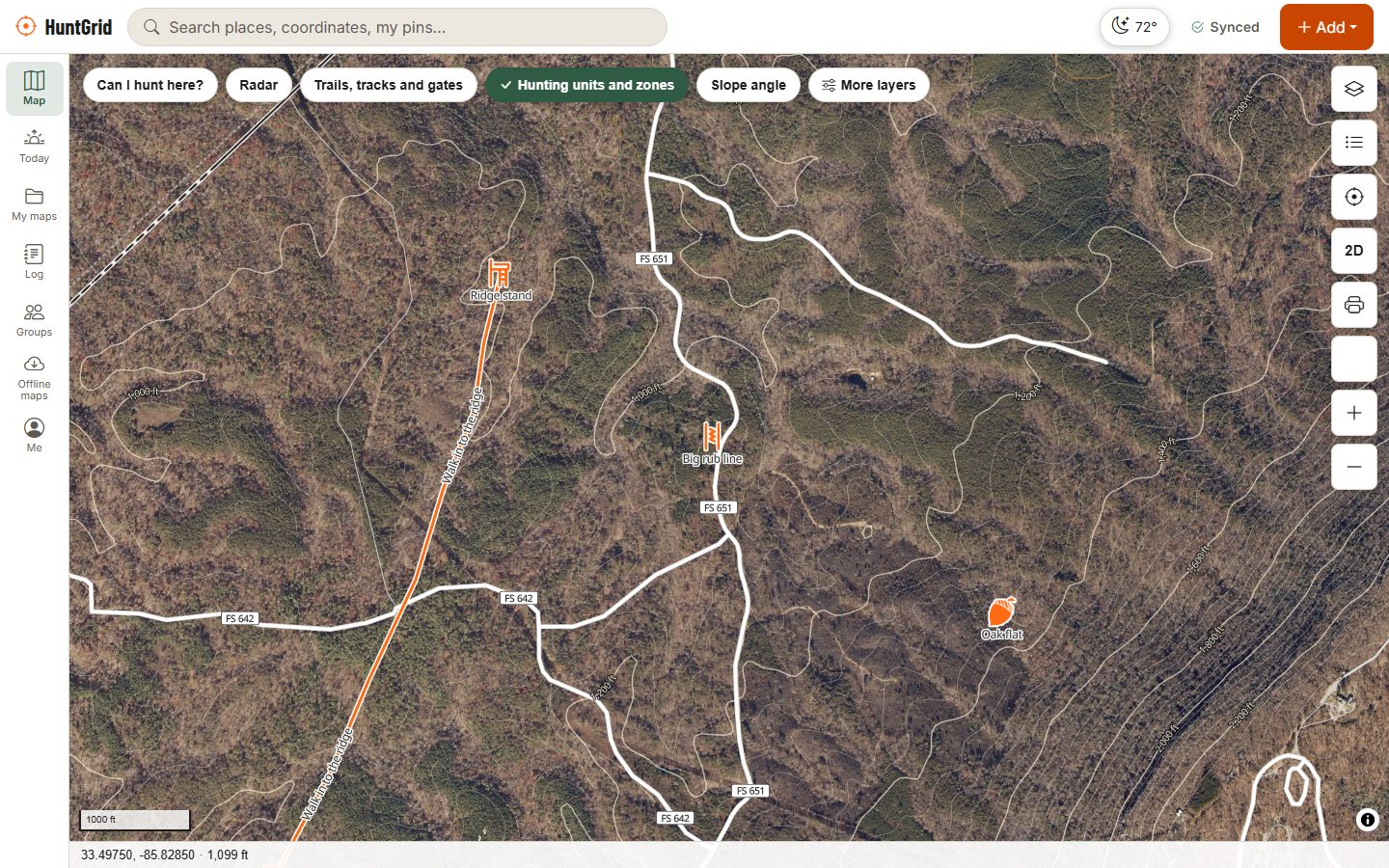
Map data © OpenStreetMap contributors, © OpenMapTiles; terrain: Copernicus WorldDEM-30 (credits)
Where the imagery comes from
No single free imagery source covers North America at high detail, so HuntGrid layers the best open imagery for each place, each credited on the map.
United States: aerial photos
USGS imagery from the USDA’s National Agriculture Imagery Program (NAIP), about 60 cm per pixel: sharp enough for field edges, trails, creek crossings and openings in the timber.
Ontario and New Brunswick
Provincial aerial photos: Ontario’s imagery south of 51°N and GeoNB’s imagery across New Brunswick, both under their open government licences.
Elsewhere in Canada
A cloud-free Sentinel-2 satellite mosaic at 10 m is being built region by region. At 10 m it shows fields, cutblocks, burns and water, not single trees or trails. Until it covers your area, the map shows its topo ground there.
Credits shown on the map: U.S. Geological Survey, National Geospatial Program (USDA NAIP); © King’s Printer for Ontario, Open Government Licence – Ontario; GeoNB, Open Government Licence – New Brunswick; contains modified Copernicus Sentinel data 2025.
How to use it
E-scout with imagery and terrain together
Pick Satellite or Hybrid
Open Layers and choose the map style. Satellite keeps the hillshade; Hybrid adds roads, trails, boundaries and labels from the topo map.
Add the land layer
Turn on “Can I hunt here?” and hunting units to see which fields and woodlots you may hunt. Public land map.
Read the edges
Look for inside corners of fields, thin strips of timber between openings, and cover near water. Tilt into 3D terrain to see how they sit on the slope.
Save it for offline
In the US, Ontario and New Brunswick the imagery can go into an offline area, so the satellite view is still there with no signal.
Good to know
Imagery has a date
Aerial photos are taken every few years. A clearcut, a new house or a washed-out road may be newer than the picture: check on the ground.
Licences we respect
HuntGrid uses only imagery whose licence allows a commercial app and, for offline copies, allows saving tiles. That’s why some provinces still wait for better imagery.
Free plan included
Satellite and Hybrid, and imagery in offline areas, are part of the free plan.
Questions
Still have a question? Read the help pages or email support@huntgrid.net.
Does HuntGrid have satellite maps for hunting?
Yes. Satellite and Hybrid map styles show USGS aerial imagery across the US and provincial aerial photos in Ontario and New Brunswick, with a 10 m Sentinel-2 mosaic being built for the rest of Canada. Your pins, land status and hunting units draw on top.
Can I use satellite maps offline?
In the US, Ontario and New Brunswick, yes: include the imagery when you download an offline area. Topo, terrain and the land layers can go offline everywhere they exist.
How detailed is the imagery?
About 60 cm per pixel from USGS in the US, and finer in parts of Ontario. The Sentinel-2 mosaic for the rest of Canada is 10 m: good for fields, cutblocks and water, not for single trees or trails.
What is the difference between Satellite and Hybrid?
Satellite shows the imagery with hillshade. Hybrid adds roads, trails, boundaries and place names from the topo map, which helps you find access and parking.
Is the satellite view free?
Yes. Satellite and Hybrid, and imagery in offline areas, are in the free plan.
Your next hunt starts on the map
Create a free account, download your area and head out. No credit card, no per-state fees.
Already have an account? Sign in