 HuntGrid
Smart alerts
Smart alerts for your stands and seasons
Turn on the alerts you want and HuntGrid keeps an eye on the forecast, the seasons and official warnings for your stands and places. When something comes up, you get one short card: tap it to see what HuntGrid saw, why it matters and where to go next.
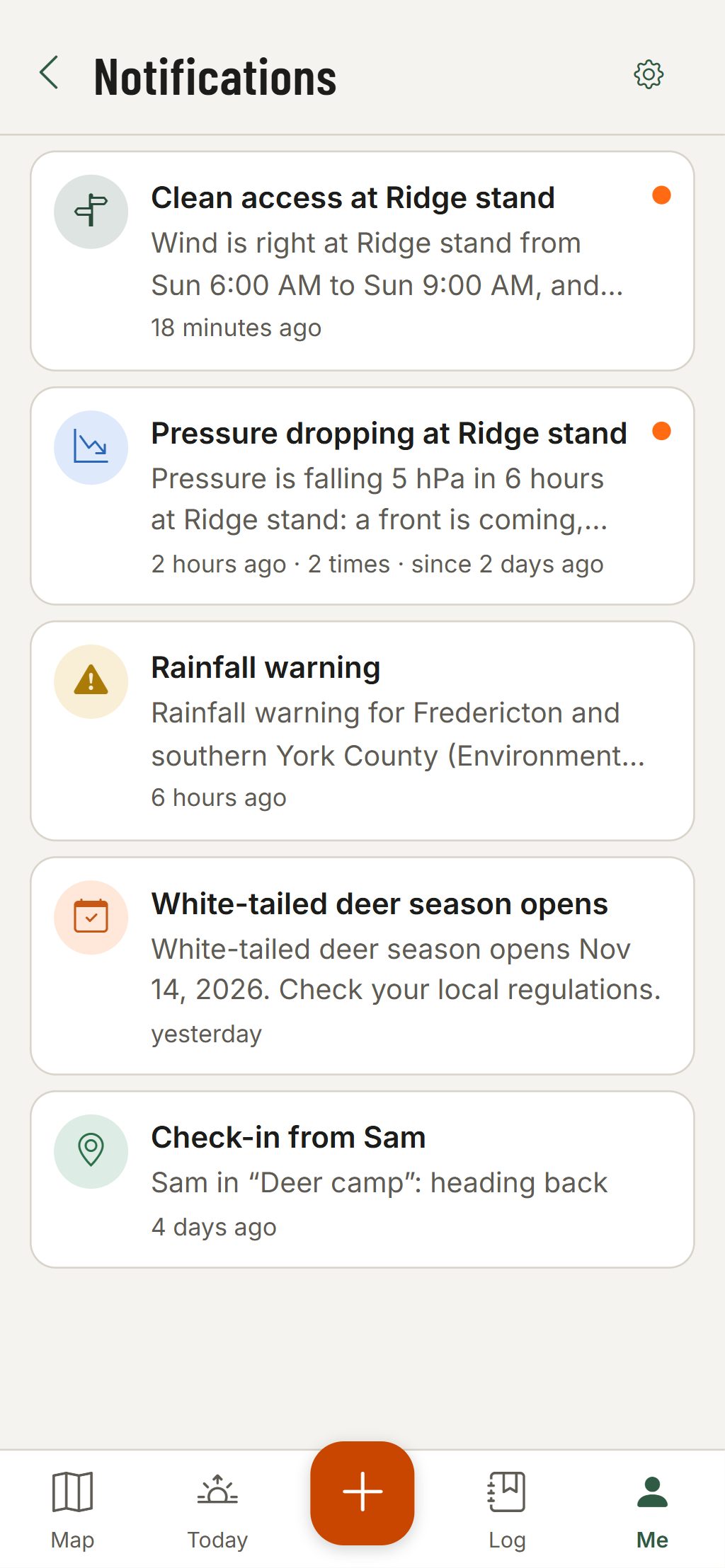
What HuntGrid can tell you
Every alert is off until you turn it on, and you can choose which stands it watches. HuntGrid checks every hour and sends no more than 6 alerts a day.
The wind is right at a stand
Tick the good winds on a stand and HuntGrid tells you when one of them lines up with a hunting window today or tomorrow that scores at least 4 out of 5.
Wind and a clean way in
Draw your access routes to a stand. When its wind is right for a dawn or evening sit, HuntGrid checks each route in and out against your sign pins and sightings from the last 30 days, and names the route that keeps your scent off them.
A fast pressure drop
When the forecast pressure at one of your spots falls at least 4 hPa (0.12 inHg) over 6 hours within the next day. A fast drop usually means a front is coming, and many hunters find game moves more just before it. It’s a pattern, not a promise.
Seasons opening and closing
For your favourite species: the day before a season opens and three days before it closes, from season dates a person has checked against the regulations.
Harvest report due
Log a harvest in your hunt log and get a reminder before it has to be reported, where the reporting deadline is on file.
Official severe weather warnings
Warnings from national weather services, such as Environment and Climate Change Canada and the US National Weather Service, that cover your spots, your offline areas or hunts you’ve planned, shown as the agency issued them.
Notifications
Tap a card for the whole story
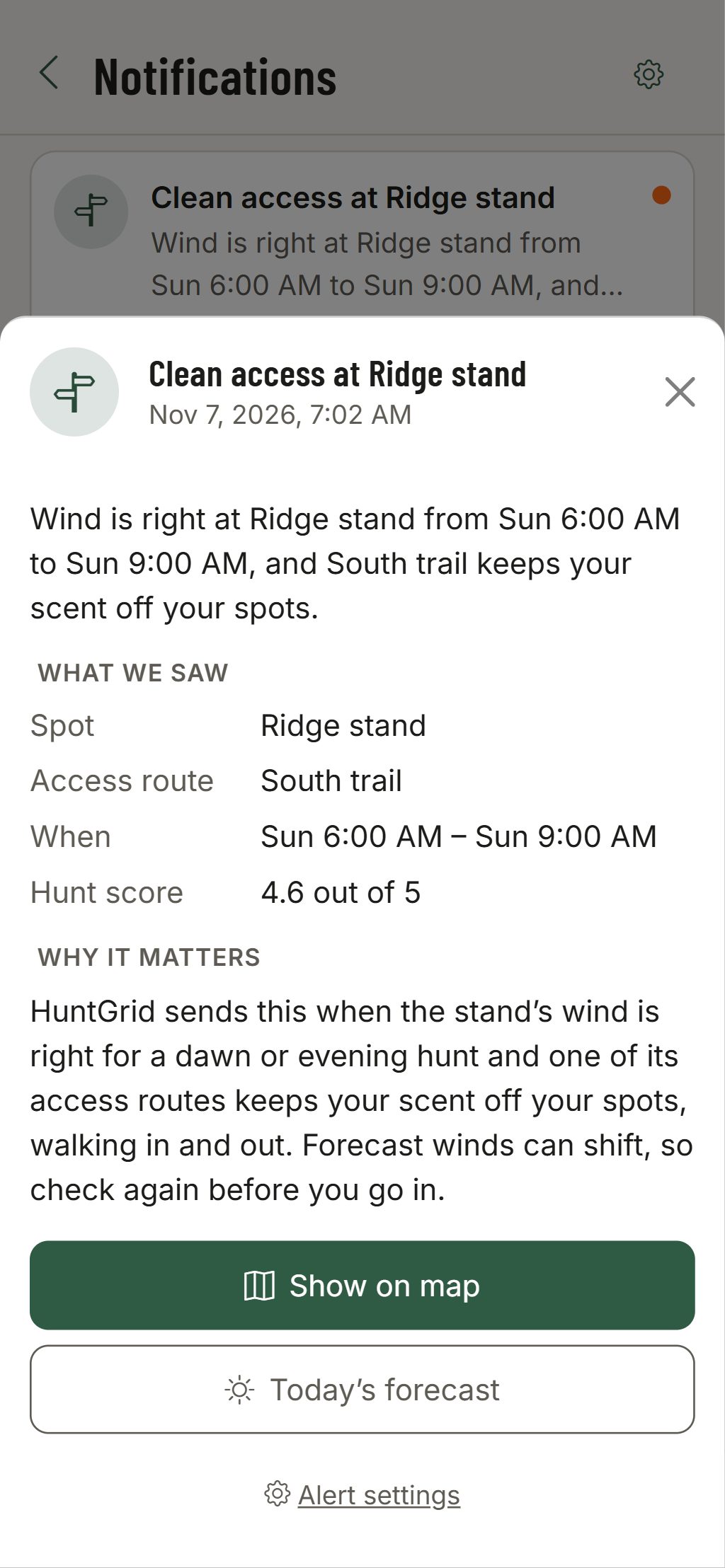
Each alert is a card with a short title and one line. Open it and HuntGrid shows its work.
- What we saw: the stand, the route, the hours and the hunt score, or the warning’s area, severity and issuing agency.
- Why it matters, in plain words, with the rule that sent it.
- Where to go next: Show on map, Today’s forecast, the season calendar or your log.
- The same alert at the same stand folds into one card, so the list stays short.
How alerts reach you
In the app
Every alert lands in your notifications, on every device you sign in to. New ones carry a dot until you’ve seen them.
One bell for every app
Each HuntGrid app keeps its own notifications, so a pressure drop at your stand never lands in the fishing app. The bell in the top bar (at the end of the search bar on a phone) counts every app’s new ones, and a push opens the app it’s about.
On your phone
As a push notification where your browser allows it (on iPhone, once HuntGrid is on the Home Screen). How to install HuntGrid.
A daily email
Prefer email? Turn on “Email me my alerts” for one morning email with the alerts you haven’t been sent yet, with a one-click stop link.
Quiet hours
Pick the hours when your phone stays quiet, in the local time where your stand is. Alerts still wait for you in the app.
A weekly outlook
A separate Thursday email for up to 5 places you hunt: the best hunting window of the next 5 days, seasons open or opening soon for your species, and official warnings.
How to set it up
Turn on what you want, nothing more
Open Alerts & emails
It’s in Me, at the top of Settings, and the set-up walkthrough asks once. Switch on the alerts you want and how they reach you.
Give it something to watch
Tick the good winds on your stands, draw your access routes and pick your favourite species. Today uses the same good winds.
Let it work
HuntGrid checks every hour on our servers, so alerts come even when the app is closed.
Good to know
A forecast, not a guarantee
Wind and pressure alerts come from the forecast for your spot. Winds shift, so check the wind at the stand before you go in.
Free
Every alert, the daily email and the weekly outlook are in the free plan.
Fishing too
HuntGrid Fishing has alerts of its own for your favourite waters, with the same free account.
Season and reporting alerts are a summary. Check your local regulations: the official regulations always have the final word.
Questions
Still have a question? Read the help pages or email support@huntgrid.net.
Can HuntGrid tell me when the wind is right for my stand?
Yes. Tick the good wind directions on a stand and turn on the wind alert. HuntGrid checks the forecast every hour and tells you when one of those winds lines up with a hunting window today or tomorrow that scores at least 4 out of 5.
Does HuntGrid have a barometric pressure alert?
Yes. It fires when the forecast pressure at one of your spots falls at least 4 hPa (0.12 inHg) over 6 hours within the next day, at most once every 2 days.
Can I get hunting alerts by email instead of on my phone?
Yes. Turn on “Email me my alerts” for one morning email with your new alerts, choose push notifications, or both. Every alert is also in the app.
Will HuntGrid flood me with notifications?
No. Every alert is off until you turn it on, repeats fold into one card, quiet hours keep your phone silent, and HuntGrid sends no more than 6 alerts a day.
Are smart alerts free?
Yes. Every alert, the daily email and the weekly outlook email are in the free plan.
Your next hunt starts on the map
Create a free account, download your area and head out. No credit card, no per-state fees.
Already have an account? Sign in